Pieces
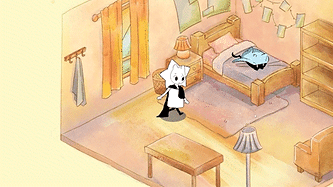
Pieces, it is a story-rich exploration game on PC featuring 2D isometric gameplay. Since we are taking part in the CYC collaboration, our target audience are kids aged 8 - 12. Pieces is about being a colourless person in a world full of colours. Players interact with NPCs to see how their choices shape them, becoming more colorful with each interaction.
Roles: Game Designer, Programmer
Engine: Godot
Genres: Narrative, 2D Puzzle, Educational
Type: Visual Novel, Fill in the grid
Team Size: 5
Why: Capstone project
Game Design
Engaging Kids
Problem: How do we engage kids to our game?
Considerations: Since our game differs from the typical big 3 kids games (Fortnite, Minecraft, Roblox). Our game won't have big firefights, infinite creativity or an infinite amount of user generated games filled with constant stimulation. I want to consider some of the individual aspects that make these games successful. Find someway to make the game memorable even if it's just one aspect.
Solution: Add Keepsake pets that kids will want to collect and remember. I wanted kids to be reminded of our game in everyday life by designing the pets as everyday items. There are some Roblox games with collecting Pets (they are fictional animals not objects).
Note: We have shifted away from this path instead to focus on a journal where kids could learn more about the characters and their emotions. We have also used this journal to add interactability to the game, like placing stickers and scratch off sections to make kids keep playing and reward using the journal.
Turn sound on
Disconnect With main Character's Emotions
Turn sound on
Problem: Playtesters had an issue with the way we were presenting the character's emotion. Said it felt too one sided. Player would go from happy to sad to angry within seconds.
Considerations: Needed to keep the colour changing, its a big part of what makes the game unique. Have a way to represent the character's emotion in a realistic way.
Process: While working on my portfolio I stumbled across an older version of the game where I had originally designed the character to have multiple colours on them. We then shifted away from this because of the change from inventory to puzzle, as well as being unsure about how to do this with a moving 2D animated character.
Solution: Make the character's star show individual colours. This would only happen during 2D conversations then when they would resonate and pick an emotion takeaway for the conversation, they would change to one colour while exploring the world.
Communication: Early on


At the beginning of our pre-production after we had chosen our main idea and topic, I wanted to do a little exercise to explain the main loop and to make sure we were all on the same page. So I printed some papers and made us all draw the core gameplay loop. This is so we could think about the flow of the game and see what everyone prioritizes. This also worked as a way to make sure everyone knows how the game will work and should look like. Finally this helped us find different details we might've not thought about or forgotten. I made us do this a few more times after this mainly when there would be a big shift in the loop or something would be added like with the mini games.
Communication: Flow Charts

Before, during or after meetings if there was a topic where members didn't understand an idea, mechanic, or a change in flow I would make flow charts. These charts would explain my reasoning, drawbacks, where it fits into the flow of the game or different directions this idea could take. Of course I used arrows but more importantly I used different coloured nodes to illustrate a change in meaning. Like using red for negatives, drawbacks and green for positives.
Communication: weekly meetings

The team and I did not have many conflicts. We had a lot of communication so, conflict were often resolved quickly or wouldn't linger for too long before we came to an agreement. What would happen often is a meeting after a long class day would cause us to be very tired. But since we didn't have much time in person, where we would be the most productive, we would have meetings anyway. So, what would end up happening is a nuanced problem would arrive or an orthodox solution would be presented and we could not quite understand or communicate it well to the degree that everyone understands. Therefore, we would all collectively agree to go home and rest. The next morning we would have an early meeting about the misunderstanding where we would always come to a unanimous decision.
Colour Wheel
Iterations

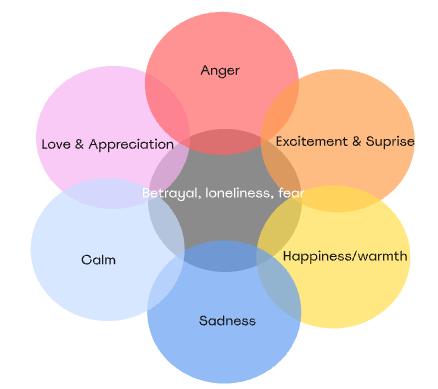
Then I made a design we could use with multiple emotions
Another simplification

Then I narrowed the emotions down
Then I made a design we could use with multiple emotions
Here is an idea I had for a colour blind mode.


My starting colours and emotions. I wanted more but I didn't want to over scope so early on
Finally I changed them to be more of a complementary colours making it easier to remember

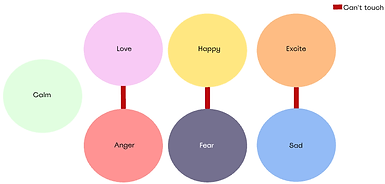
Then I made another one with different colours. They didn't fit our colour aesthetic and calm and sad were too similar. The diagram is for a grid rule we may not use
Programming
Lessons Learned:
-
Getting feedback from play testers and teammates is such an invaluable asset.
-
So many things I had overlooked or thought people would differentiate
-
Players are learning everything for the first time and having a small thing like different shades of blue is something that could go unnoticed.
Grid Puzzle

I got the basic grid, pick up and place functions from this YouTube video.
I then made changes and additions throughout development of the game. I also had to make it flexible enough for modular changes and for teammates to understand
Then I made it so you can place down space on the screen since it was originally gonna be an inventory system like RE 4. This is still necessary for the puzzle but it was a priority for the inventory
Next to add some challenge I added a rule for placing the blocks. Some pieces couldn't be next to other colours because of their emotional ties. This would also be visually shown to the player. This was ultimately scrapped but a cool thing.
Finally, I added the puzzle elements when I pivoted. So now multiple pieces would spawn after dialogue had ended, and included a win condition. After finishing the puzzle a resonate screen shows up before players can close the puzzle screen.


Journal
Page changing
Page Nodes
/ Layout
Here I have the nodes and the generic layout of the pages. This is a prefab so that I can use this for the multiple pages for characters pages and, a different prefab for the different emotions. I have 2 versions of each page. One is filled in with the information and the other is filled out with blank statements and pictures.
Page Changing
So when the player swaps pages the game goes through the same code. Check metadata, check direction arrows, and a character page check. These all work because I gave the page nodes metadata and put them in a group.
Journal Entries
Similar to the page changing I used metadata and groups. I also use the signal function from Dialogic to send a signal during specific dialogue to the journal, that also triggers the icon shake and ding.


I programmed the world for players to explore.

I programmed almost everything in the game! I used GD script to program everything.

Finally a journal to keep the memories of what's happened so far
I programmed the world for players to explore.